
Team Uniform Order Form: How to Collect Sizes Without Errors
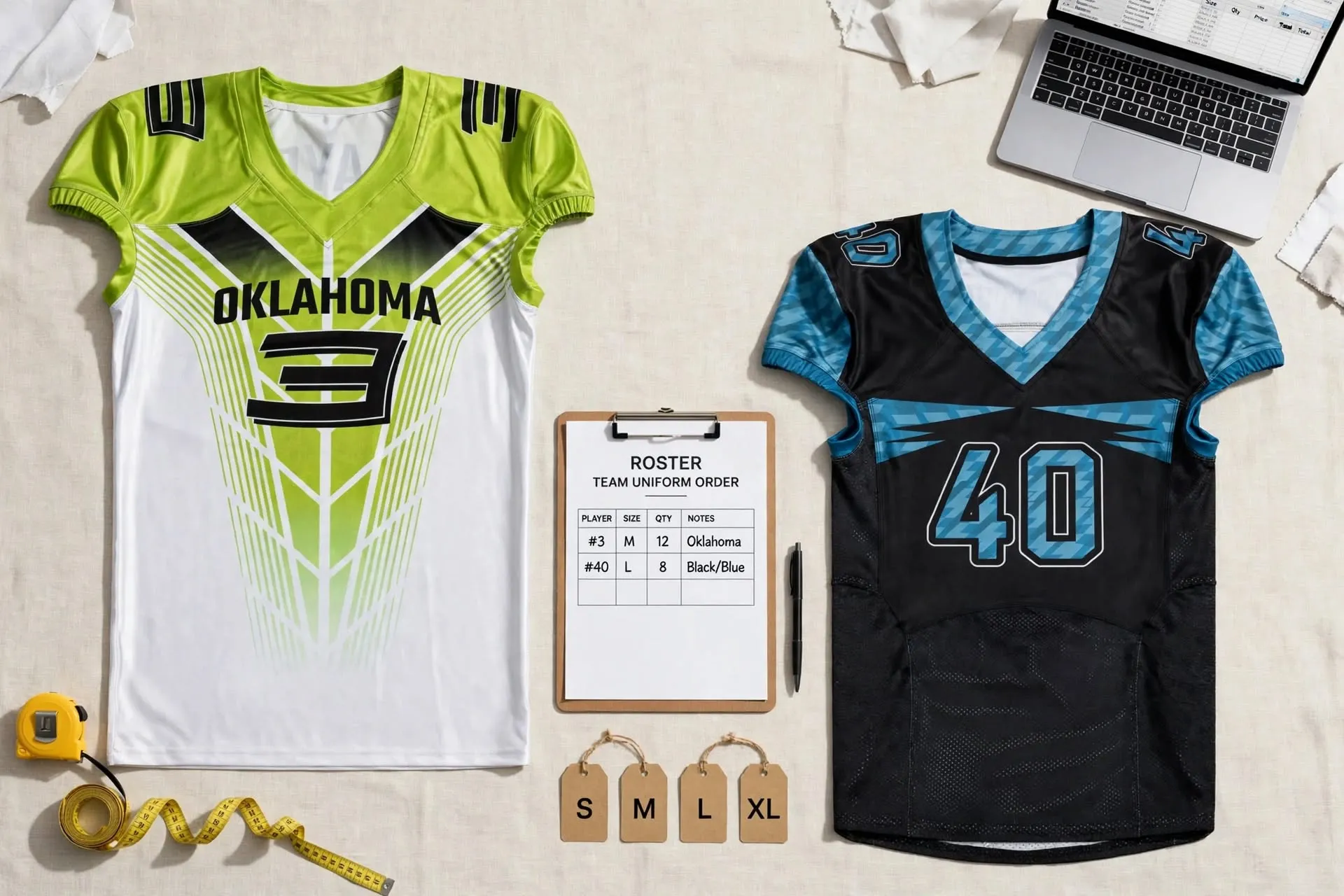
Most uniform problems don’t start at the factory. They start with a group chat full of “I think I’m a medium,” a name spelled two different ways, and three players who all want number 10. A well-built team uniform order form fixes that before it becomes a reprint. It gives every player, parent, and coach one place to submit sizes, names, and numbers, and it gives your manufacturer one clean file to produce from.
This guide covers what to include in your form, a uniform order form template you can copy, how to collect sizes without guesswork, how to handle number requests, and the checks to run before you send the order.
What a Team Uniform Order Form Needs to Do
A sports uniform order form has three jobs:
- Collect accurate information from each player, including sizes for every garment, the name to print, and the number.
- Turn that information into production quantities, such as how many medium jerseys and how many youth large shorts.
- Create a record you can check against, so the delivered uniforms can be compared with what was approved.
If your current jersey order form only asks for “size” and “number,” it covers part of the first job and none of the others.
Fields to Include in a Uniform Size Form
Player and Contact Details
Collect each player’s full name and a contact email or phone number. For youth teams, collect a parent or guardian contact rather than the player’s. Add a team or division field if you’re ordering for several squads at once.
Sizes for Every Garment
Ask for a separate size for each item: jersey, shorts or pants, socks, warm-ups, and anything else in the kit. Players often need different sizes on top and bottom, and a single “size” field forces a guess.
Names and Numbers
Ask players to type the name exactly as it should be printed, and add a confirmation field for spelling. Decide in advance how you’ll handle capitalization, accents, hyphens, and spacing, and say so on the form. For numbers, collect a first, second, and third choice.
Fit, Cut, and Special Requests
If your manufacturer offers different cuts, include a field for fit category, such as men’s, women’s, or youth. Leave a notes field for requests like longer sleeves or extended sizes. Check with your supplier which requests they can accommodate.
Uniform Order Form Template
Copy these columns into Google Sheets, Excel, or any online form tool. One row equals one player.
| Column | Example entry | Why it matters |
| Player ID | 014 | Tracks players even if names change |
| Player full name | Jordan Ellis | Matches roster and payment records |
| Contact (parent/guardian for youth) | Email or phone | Follow-up on missing details |
| Team or division | U14 Girls | Separates multiple squads |
| Fit category | Youth / Women’s / Men’s | Matches the correct size chart |
| Jersey size | YL | Production quantity |
| Shorts/pants size | YM | Tops and bottoms often differ |
| Name on back (as printed) | ELLIS | Prevents spelling errors |
| Number: 1st / 2nd / 3rd choice | 7 / 17 / 27 | Resolves duplicates quickly |
| Confirmed number | 17 | The only number sent to production |
| Notes | Extended length | Flags special requests |
The same structure works as a team order form template for practice gear, warm-ups, or fan apparel. For a simpler team shirt order form, or a t-shirt order form template for supporters, keep the name, contact, size, and quantity fields and drop the number fields.
Turning Responses Into a Uniform Size Spreadsheet
Whether you collect responses on paper or online, finish with one uniform size spreadsheet. It works best with three tabs.
The Roster Tab
This is your team roster template: one row per player, using the columns above. It’s the master record for names, numbers, and individual sizes.
The Size Summary Tab
Use a count formula to total each size for each garment. In Google Sheets or Excel, for example, a COUNTIF across the jersey size column tells you how many medium jerseys you need. List spares on a separate line so they’re never confused with player orders.
The Change Log
Record every change made after the first submission: who asked, what changed, and when. If a delivered jersey doesn’t match, the log shows whether the error came from the form or from production.
How to Collect Sizes Without Guesswork
Use the Manufacturer’s Size Chart, Not Size Letters
A medium from one brand isn’t a medium from another, and sizing expectations can vary between countries. Put your manufacturer’s current size chart on the form itself, and ask players to choose from that chart.
If your supplier publishes finished garment measurements, say so clearly. Players often compare those numbers with their body measurements by mistake.
Measure a Garment That Already Fits
For many teams, the most reliable method is simple. Ask each player to lay a jersey they like flat and take two measurements: across the chest just below the armholes, and from the top of the shoulder to the hem. Then compare those numbers with the chart. Include both inches and centimeters for international rosters.
Use a Size Set or Fit Session When Possible
If your supplier can provide sample sizes, a short try-on session at practice removes most of the guesswork. Ask your manufacturer whether size samples are available for your product.
Special Cases
Youth Players and Growth
It’s tempting to size every youth player up for growth. But oversized uniforms can look sloppy and hang awkwardly during play. Use current measurements as the starting point, and be cautious about sizing up more than one step.
When a Player Falls Between Sizes
Decide on a team rule, such as “between sizes, go up one,” and print it on the form. A consistent rule prevents dozens of individual judgment calls.
Running a Jersey Number Request Form
Numbers cause more disputes than sizes. A simple jersey number request form reduces them:
- Collect three choices per player.
- Publish the tie-break rule in advance, such as seniority, first submitted, or coach’s decision.
- Check any league or governing-body numbering rules for your sport, since restrictions vary by league and season.
- Share the confirmed number list with the team before the order is placed.
Sublimated jerseys print names and numbers as part of the design. That’s convenient, but it also means a typo is permanent. Our complete guide to sublimation printing for teams explains why proofing matters.
Paper Forms, Online Forms, or Spreadsheets?
| Method | Works best for | Watch out for |
| Paper form | In-person sign-ups, small teams | Handwriting errors and manual data entry |
| Online form (Google Forms, Microsoft Forms) | Clubs, schools, multiple teams | Make size and number fields required |
| Shared spreadsheet | Coaches managing one roster directly | Lock edits after the deadline |
Online forms usually make the cleanest uniform sizing form. They can require every field, show a size chart image, and export straight to a spreadsheet.
Deadlines, Reminders, and Change Cutoffs
Set a submission deadline well ahead of the date you need to place the order. Your manufacturer’s production and shipping timeline sets the real deadline, so confirm it first and work backward from there.
Send reminders a week before, a few days before, and the day before the deadline. Then set a firm cutoff for size changes. After that date, changes are handled with spares, not by editing the production file.
Roster changes are normal over a season. Our lacrosse uniforms guide for teams covers how to plan for them, and the same principle applies to any sport.
Final Checks Before You Send the Order
Before you send the file, confirm that:
- The number of rows matches the number of players.
- Every player has a size for every garment.
- Size totals in the summary tab match the roster tab.
- Names are spelled correctly and formatted consistently.
- No number is duplicated within the same team.
- Spares are listed separately.
- Unusual entries, such as a single 4XL or XS, have been double-checked.
- Two people have reviewed the final proof against the spreadsheet.
Our guide on how to design a custom jersey includes a similar size and quantity sheet as part of the full design process.
Sending Your Size Breakdown to Deuka Wears
Once the spreadsheet is final, it becomes the brief for your order. Deuka Wears manufactures custom team uniforms in Sialkot, Pakistan, for teams in the USA, Canada, and international markets. That includes soccer uniforms, basketball jerseys and shorts, and lacrosse pinnies and mesh jerseys.
Our quote form asks for product sizes and quantities, so attach your size summary, along with the roster tab for names and numbers. Ask for our current size chart before you circulate your form, so players choose from the right measurements.
- Clubs and leagues ordering for several teams can review wholesale and bulk ordering.
- Brands with their own fit specifications can discuss them through our private label services.
- Fan and supporter shirts can be added from our custom polo and sublimation T-shirts range.
When your sizes are ready, request a quote.
Frequently Asked Questions
Should we collect size letters or measurements?
Measurements are more reliable, because size letters vary between brands. If you collect letters, put the manufacturer’s size chart directly on the form so players choose from the right one.
How many spare uniforms should we order?
It depends on roster size and how often players join mid-season. Many teams add a few spares in their most common sizes. List them separately from player orders.
Can youth, women’s, and men’s sizes be on one order form?
Usually, yes. Add a fit category column so each player is matched to the right chart. Then ask your manufacturer how mixed fits count toward any minimums.
What’s the best free tool for a team uniform order form?
Google Forms and Microsoft Forms both work well. They can require fields, show a size chart image, and export responses to a spreadsheet.
What if a player’s name or number changes after the order is placed?
Contact your manufacturer immediately. Whether a change is still possible depends on how far production has progressed, so keep the change log current and confirm final details before approving the proof.
Final Thoughts: Get the Form Right and the Uniforms Follow
Sizing errors, misspelled names, and duplicate numbers rarely come from one big mistake. They come from small gaps: a missing field, a size letter without a chart, a change made in a text message instead of the spreadsheet. A well-structured team uniform order form closes those gaps before production starts.
Treat the form as the foundation of your order:
- Collect a size for every garment.
- Use your manufacturer’s size chart.
- Settle number requests with a published rule.
- Keep one master spreadsheet with a change log.
- Run the final checks before anything is sent.
Then whether you’re outfitting one varsity squad or a club with a dozen age groups, the uniforms that arrive should match the roster that was approved, with fewer reorders, fewer disputes, and a team ready for its first game.
TOP RATED PRODUCTS
New posts

November 2, 2026
Print-Ready Artwork: File Formats Jersey Manufacturers Need

November 2, 2026
IBJJF Rash Guard Rules: Ranked Colors for Every BJJ Belt

November 2, 2026
Leather vs Synthetic Boxing Gloves: What Brands Should Pick

November 2, 2026
Clothing Manufacturers in Pakistan: Sportswear Buyer’s Guide

November 2, 2026
Lacrosse Jersey Numbers: Rules for Pinnies and Game Uniforms

November 2, 2026
4-Way Stretch Fabric: Why Fightwear Brands Depend on It

November 2, 2026
Moisture-Wicking Fabric: How It Works in Team Sportswear

November 2, 2026

Leave a comment